
Choosing VAT Type
NexoPOS provides multiple ways to apply taxes during sales. This flexibility allows businesses to adapt the system to different tax regulations and operational needs.
Tax behavior is controlled through the VAT Settings, where you define how taxes should be applied across all sales.
Accessing VAT Settings
To configure how taxes are applied:
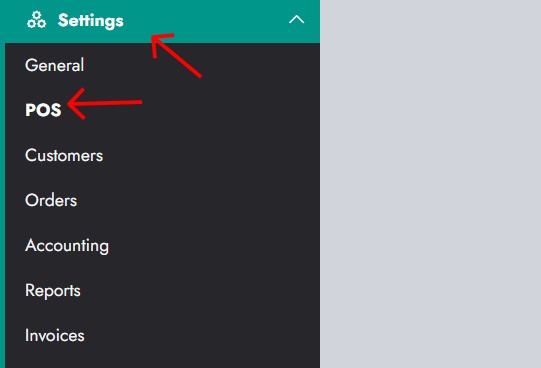
- Go to Settings
- Click on POS
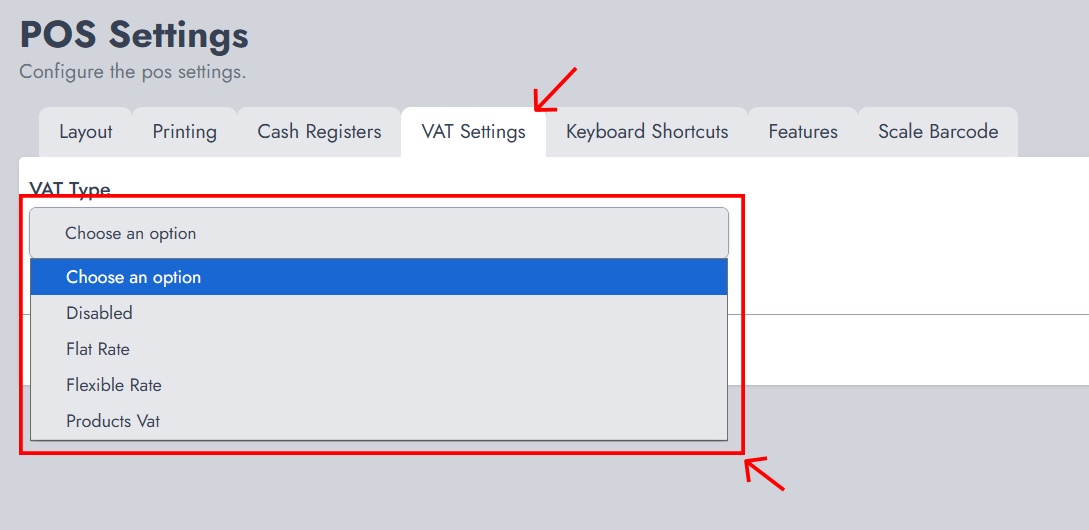
- Open the VAT Settings tab
From there, you can select the VAT Type, which determines how taxes are handled during sales.
VAT Types Overview
NexoPOS supports three main VAT types:
- Flat Rate
- Flexible Rate
- Products VAT
Each mode changes how tax groups are applied when processing sales.
Flat Rate
Flat Rate applies a single tax group to all sales.
With this configuration:
- Every product sold uses the same tax group
- No selection is required during checkout
- Tax calculation is consistent across all items
This is ideal for businesses where:
- A single tax rate applies to all products
- The tax system is simple and uniform
Example: A store with a fixed 10% VAT on all items can use Flat Rate to simplify operations.
Flexible Rate
Flexible Rate allows the cashier to choose a tax group during the sale.
With this configuration:
- The tax group is selected at checkout
- The selected tax applies to all items in the order
- Different transactions can use different tax groups
This is useful when:
- Taxes vary depending on context (e.g., location, customer type)
- The same product may be taxed differently in different situations
Example: A business that applies different tax rates for dine-in vs takeaway can switch tax groups per order.
Products VAT
Products VAT applies taxes based on each product’s assigned tax group.
With this configuration:
- Each product has its own tax group
- Taxes are automatically applied when the product is added to the cart
- No manual selection is required during checkout
This is the most precise method and is ideal when:
- Products have different tax rates
- The tax system is complex
Example:
- Food items are taxed at 5%
- Electronics are taxed at 20%
Each product carries its own tax rule.
Choosing the Right VAT Type
The choice depends on how taxes are structured in your business:
- Use a flat rate for simplicity and uniform taxation
- Use a flexible rate for dynamic tax application per sale
- Use Products VAT for detailed, product-level taxation