
Deployment
How to run NexoSaaS: Docker stack, host reverse proxy, base domain, and TLS.
What you are deploying
| Component | Role |
|---|---|
| app (PHP-FPM) | Laravel control plane |
| nginx (compose) | Serves control plane + generated tenant vhosts |
| horizon | Queue workers (provision, backups, mail, etc.) |
| scheduler | schedule:work (billing lifecycle, backup waves, …) |
| mysql | Control plane + per-install tenant databases (Docker) |
| redis | Cache, sessions, queues |
| Host agent | Creates tenant paths, nginx snippets, SSL, DBs |
Customer NexoPOS sites are not separate Compose services. The agent writes files to HOST_AGENT_HOME_BASE, and nginx includes its vhosts.
1. Docker installation
Prerequisites
- Docker Engine + Docker Compose v2
- Ports free (defaults): 8080 (HTTP), 3307 (MySQL host), 6380 (Redis host)
Steps
# From the repository root
cp deploy/.env.docker.example .env

# Optional: set a stable public URL early (production example)
# APP_URL=https://app.yourdomain.com
# APP_ENV=production
# APP_DEBUG=false

docker compose -f deploy/docker-compose.yml up -d --build
Compose entrypoints typically generate APP_KEY and run migrations when configured. Seed catalog + default admin once:
docker compose -f deploy/docker-compose.yml exec app php artisan db:seed --force
Default seeded accounts (dev only):
| Role | Password | |
|---|---|---|
| Platform admin | [email protected] | password |
| Test user | [email protected] | password |
Open the control plane: http://localhost:8080 (or your APP_URL).
Readiness:
docker compose -f deploy/docker-compose.yml exec app php artisan platform:launch-check
Important environment variables
Product secrets (Stripe, SMTP, GitHub PAT, S3, domain policy) are Admin → Settings, not runtime env.
| Variable | Typical Docker | Notes |
|---|---|---|
| APP_URL | http://localhost:8080 | Must match the URL browsers use (payment return URLs) |
| APP_ENV / APP_DEBUG | local / true | Production: production / false |
| PLATFORM_BASE_DOMAIN | localhost | Seed-only default for Admin Domain base_domain |
| HOST_AGENT_DRIVER | local | Docker/CI. Production VPS isolation: script |
| HOST_AGENT_HOME_BASE | /home | Tenant homes + .platform/nginx-enabled |
| HOST_AGENT_LOCAL_REAL_CLONE | false | true = real NexoPOS tarball (needs network + GitHub) |
| HOST_AGENT_TENANT_DB_* | MySQL service | Per-install DB creation in Docker |
| QUEUE_CONNECTION | redis | Required for Horizon |
Host agent modes
| Driver | Use when |
|---|---|
| local | Docker / evaluation. Same path layout as production, shared FPM, no real useradd. |
| script | Real Linux VPS: OS users, per-user FPM, system nginx, true isolation. |
Compose is not a full multi-tenant production isolation story by itself. Use script on a VPS when you need production-grade tenant separation.
2. Host Nginx in front of the stack
Recommended production shape:
Internet
   │
   ▼
Host Nginx / Caddy  (TLS termination, :443)
   │  proxy_pass → 127.0.0.1:8080
   ▼
Compose nginx       (control plane + tenant includes)
   │
   ▼
Compose app (PHP-FPM) + tenant docroots on volume
Example host Nginx (control plane)
Replace hostnames and upstream port with yours.
# /etc/nginx/sites-available/nexosaas-control.conf
server {
    listen 80;
    server_name app.yourdomain.com;
    return 301 https://$host$request_uri;
}

server {
    listen 443 ssl http2;
    server_name app.yourdomain.com;

    # ssl_certificate     /etc/letsencrypt/live/app.yourdomain.com/fullchain.pem;
    # ssl_certificate_key /etc/letsencrypt/live/app.yourdomain.com/privkey.pem;

    client_max_body_size 64M;

    location / {
        proxy_pass http://127.0.0.1:8080;
        proxy_http_version 1.1;
        proxy_set_header Host $host;
        proxy_set_header X-Real-IP $remote_addr;
        proxy_set_header X-Forwarded-For $proxy_add_x_forwarded_for;
        proxy_set_header X-Forwarded-Proto $scheme;
        proxy_read_timeout 120s;
    }
}
Set:
APP_URL=https://app.yourdomain.com
Laravel trusts forwarded headers when configured for your proxy setup; ensure the app sees HTTPS correctly so signed URLs and cookies stay secure.
Screenshot placeholder: Browser open on the control plane login at your public HTTPS URL
Tenant hostnames
- Docker / local agent: tenant nginx configs are written under {HOST_AGENT_HOME_BASE}/.platform/nginx-enabled/*.conf and included by the Compose nginx (deploy/docker/nginx/default.conf).
- Local browser: http://{install-subdomain}.localhost:8080 often works without /etc/hosts.
- Production: DNS for *.base_domain (and custom domains) must reach the same edge that can route to the platform nginx (or the VPS nginx managed by the script agent).
If the host reverse proxy only forwards app.yourdomain.com, tenant subdomains need either:
- the same proxy with a wildcard server_name / separate server blocks, or
- direct exposure of the platform nginx / agent-managed vhosts.
Plan DNS and TLS for tenants together with the base domain (next section).
3. Base domain
Installations get a free platform hostname:
{slug}.{base_domain}
Example: base domain saas.example.com → acme-store.saas.example.com.
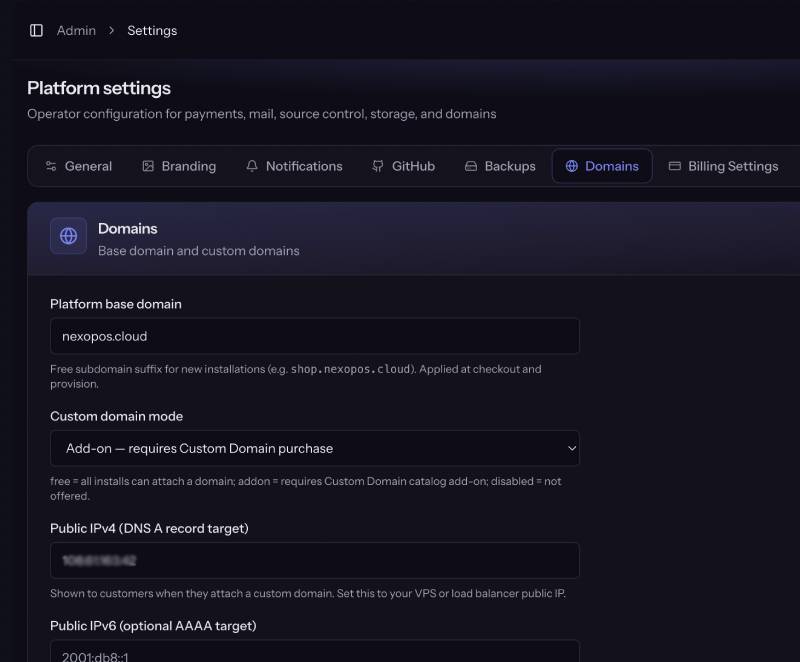
Configure in Admin
- Sign in as platform admin (2FA outside local).
- Open Admin → Settings → Domain.
- Set:
DNS
| Record | Name | Target |
|---|---|---|
| A | app.yourdomain.com (control plane) | VPS public IP |
| A (or CNAME) | *.saas.example.com | Same IP (or load balancer) |
| Optional AAAA | same hosts | Public IPv6 |
PLATFORM_BASE_DOMAIN in .env only seeds the Admin value on empty settings; runtime uses Admin → Domain.
4. SSL / Let’s Encrypt
Control plane (host reverse proxy)
Using Certbot (example):
# After DNS for app.yourdomain.com points at the VPS
sudo certbot --nginx -d app.yourdomain.com
# or: certbot certonly --webroot ... then point ssl_certificate paths
Using Caddy is often simpler (automatic HTTPS); reverse_proxy to 127.0.0.1:8080.
Tenant certificates
On provision and custom-domain verification, the host agent is responsible for TLS for tenant hostnames (Let’s Encrypt style flow on the VPS / agent path).
Operators should:
- Ensure the VPS can complete HTTP-01 (or the agent’s chosen challenge) for install hostnames.
- Set max verified domain changes per day reasonably (default 3) so customers do not burn LE rate limits.
- Keep public IPv4 accurate so DNS instructions customers see are correct.
Note: Local Docker with *.localhost does not need public LE for day-to-day UI testing.
Payment webhooks
Production gateways must reach HTTPS endpoints, e.g.:
- https://app.yourdomain.com/webhooks/stripe
- https://app.yourdomain.com/webhooks/paddle
- https://app.yourdomain.com/webhooks/mollie
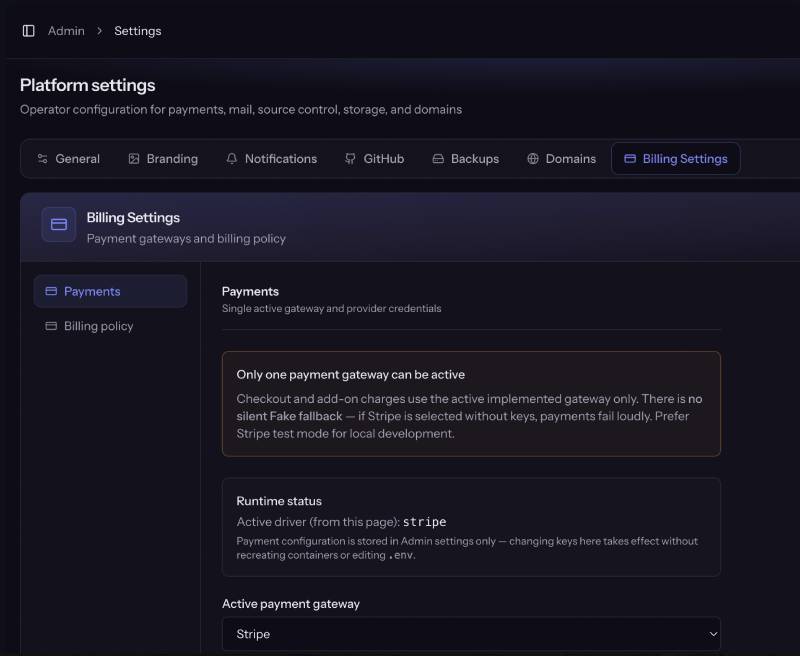
Configure signing secrets under Admin → Settings → Billing Settings.
5. Post-deploy checklist
| Step | Command / action |
|---|---|
| Stack healthy | docker compose -f deploy/docker-compose.yml ps |
| Seed catalog / admin (once) | exec app php artisan db:seed --force |
| Launch check | exec app php artisan platform:launch-check |
| Horizon running | Compose horizon service Up |
| Scheduler running | Compose scheduler service Up |
| First admin usable | Verify email + 2FA |
| Product config | SMTP, payments, GitHub, S3, domain |
| Fake payments | Not allowed in production launch-check |
Useful ops commands
# Shell into app
docker compose -f deploy/docker-compose.yml exec app bash

# Logs
docker compose -f deploy/docker-compose.yml logs -f app horizon nginx

# Rebuild frontend assets
docker compose -f deploy/docker-compose.yml run --rm -e DOCKER_FORCE_BUILD_ASSETS=true assets

# Wipe evaluation installs (keeps users/catalog/settings)
docker compose -f deploy/docker-compose.yml exec app \
  php artisan platform:reset-evaluation --force