Footer Customization
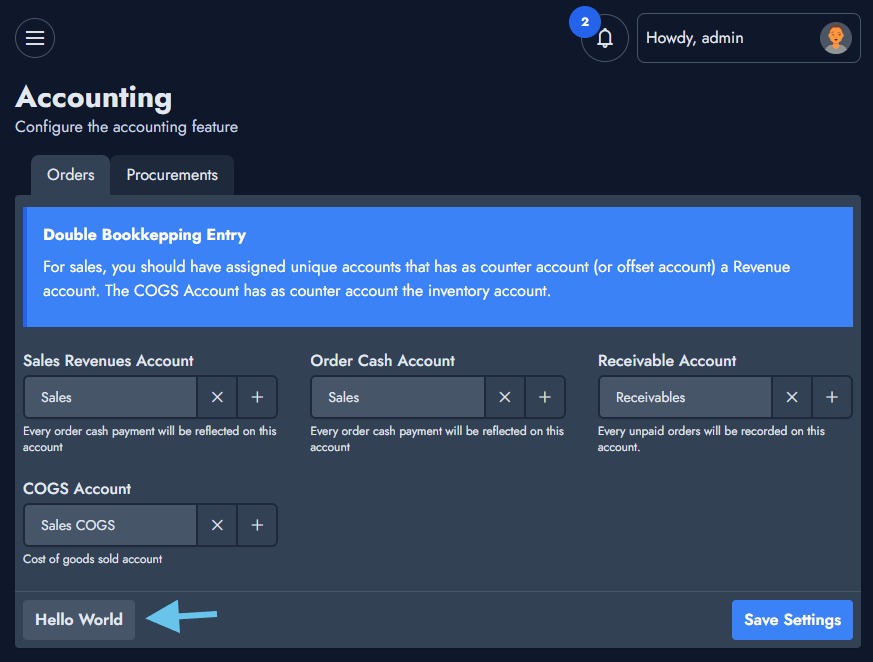
From NexoPOS 5.3, you can render custom Vue components at the footer of any settings object. The idea is to give way to interact with the current form being rendered. You'll typically use that to (not limited to):
- reset default settings
- save settings differently
- etc.
Requirements
Before loading a custom component at the settings footer, you must inject that component first. While defining your component, the settings component will provide a "parent" property to that component so you can access the settings form from your component and eventually reload the settings if necessary (console.log will be your best friend).
<script type="module">
  nsExtraComponents.myExtraComponent = defineComponent({
      props: [ 'parent' ],
      template: `<ns-button>Hello World</ns-button>`,
      mounted() {
          // this.parent.loadSettingsForm() : Use this to refresh the form.
      }
  });
</script>
Define Component On Settings Class
If your module defines settings classes, we'll use it to add our custom buttons. A typical settings class will look like this:
<?php
namespace Modules\MyModule\Settings;

use App\Services\SettingsPage;
use App\Classes\SettingForm;

class ModuleSettings extends SettingsPage
{
    const IDENTIFIER = 'my-module-settings';
    const AUTOLAOD = true;

    public function __construct()
    {
          $this->form   =   SettingForm::form(
              title: __m( 'Your Setting Title', 'MyModule' ),
              description: __m( 'Your module settings description', 'MyModule' ),
              tabs: SettingForm::tabs(
                  SettingForm::tab(
                      label: __m( 'Base Settings', 'MyModule' ),
                      identifier: 'base-settings',
                      fields: SettingForm::fields(
                          FormInput::text(
                              label: __( 'Email' ),
                              name: 'email'
                          )
                      )
                  )
              )
          );
    }
}
Now, we'll add to the "tab" section a new sub-section "footer" which supports "extraComponents" which will define an array of strings (which are the names of the vue components you defined on the nsExtraComponents above). In the above settings, we used "myExtraComponent" as the name of our Vue component; that's what we'll use.
<?php
namespace Modules\MyModule\Settings;

use App\Services\SettingsPage;
use App\Classes\SettingForm;

class ModuleSettings extends SettingsPage
{
    const IDENTIFIER = 'my-module-settings';
    const AUTOLAOD = true;

    public function __construct()
    {
          $this->form   =   SettingForm::form(
              title: __m( 'Your Setting Title', 'MyModule' ),
              description: __m( 'Your module settings description', 'MyModule' ),
              tabs: SettingForm::tabs(
                  SettingForm::tab(
                      label: __m( 'Base Settings', 'MyModule' ),
                      identifier: 'base-settings',
                      footer: SettingForm::tabFooter(
                          extraComponents: [ 'myExtraComponent' ] // <= we define the component here
                      ),
                      fields: SettingForm::fields(
                          FormInput::text(
                              label: __( 'Email' ),
                              name: 'email'
                          )
                      )
                  )
              )
          );
    }
}
We should have a setting that looks like this.