
Table Component
NexoPOS is built with a set of components that are reused throughout the application. One of these components is the "Table" component (or CRUD Table). The Table component should be considered an "abstract" component because it's used by other components. This component is responsible for displaying entries (or records) within an HTML table. This is what a table component looks like.
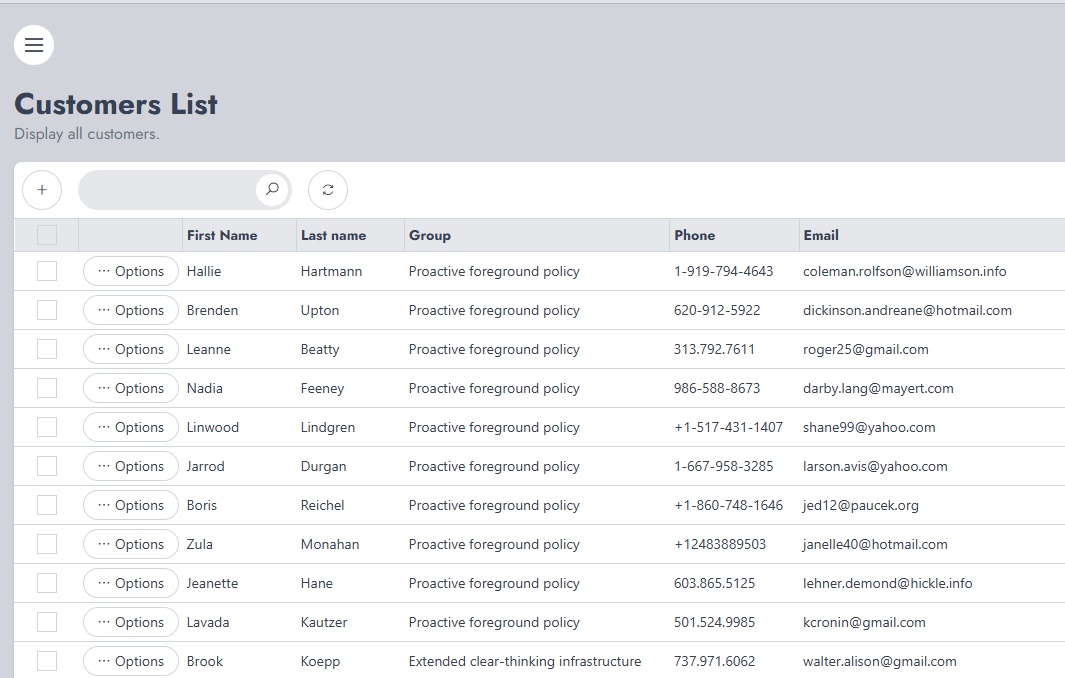
Table Component Features
The table component can be used to display entries in various ways. Here is the list of features available with that component.
Sorting Results
While it depends on the CRUD instance that renders the Table component, every column is normally sortable. This means you can change the order used for displaying the results just by clicking on a column title.
Multi-Selecting Results
If it's not explicitly disabled, every result in a Table component can be selected. This is useful when a bulk action should be applied. By bulk action, we mean deleting selected entries for example.
Searching Entries
The table components come with a search input where specific entries can be searched. A search is made over the entire linked table and related tables (as they are all merged in a single request). However, if a column uses a label for example, "Enabled" might be a label for "1", it's not possible to perform a search for all items having "Enabled" as a label. Details about these possibilities should be provided by the parent component rendering the table component.
Creating New Entries
The Table component comes with a button with a "+" sign in the middle. If that button is correctly defined, it should take you to the form where new entries can be created.
Entries Row Actions
By default, all entries come with "Edit" and "Delete" actions. However, these actions might be different from one component to another.
Browsing Through Pages
If a table component contains many entries, these might be paginated. In order to access these pages, you can use one of the page numbers available at the bottom of the table component.