
Disabling Modules From Database
While configuring a plugin on NexoPOS, a misconfiguration may prevent access to the dashboard. In such cases, the login page will not help, and you’ll need to disable the problematic module manually before you can log in and correct the configuration.
This situation commonly occurs with modules like Google reCAPTCHA when invalid client keys or secrets are provided.
This guide explains how to disable a module on NexoPOS without accessing the dashboard.
How to Identify the Module to Disable
The first step is to identify the module’s namespace (its unique identifier).
To do this, browse the folders inside the modules directory and locate the module in question. Open its config.xml file to confirm its identity.
The config.xml file contains essential metadata used by NexoPOS, including:
- The module name (human-readable)
- The namespace (used internally)
- The version
- The author
- The description
Once you’ve confirmed the module (e.g., Google reCAPTCHA), copy the value of the <namespace> tag. For example: GoogleRecaptcha.
How to Disable a Module via Database (PhpMyAdmin)
To disable the module, you’ll need access to your database manager (e.g., PhpMyAdmin).
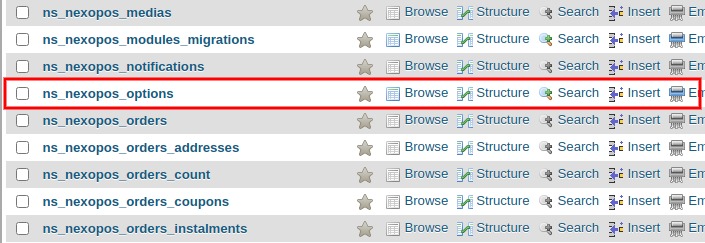
- Open your database. You can find its name in the .env file.
- Locate the nexopos_options table. Depending on your table prefix (default is ns_), the table may be named ns_nexopos_options.
- This table stores key-value pairs. Look for the entry where the key is enabled_modules.
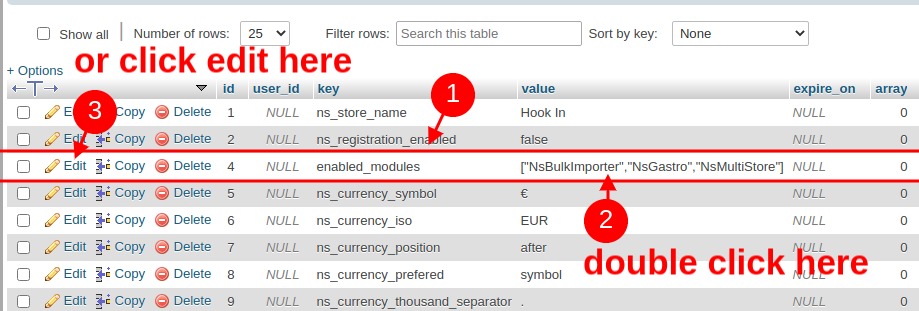
The corresponding value is typically a JSON array (or sometimes an object) listing all enabled modules.
Example:
["NsGastro", "NsMultiStore", "GoogleRecaptcha"]To disable the module, remove its namespace from the array:
["NsGastro", "NsMultiStore"]Make sure to also remove any trailing commas to maintain valid syntax.
If you prefer to disable all modules, you can simply delete the entire entry with the key enabled_modules.
Once completed, the module will be disabled, and you should be able to access the dashboard again and correct the configuration.