
Queues Jobs Are Disabled
To handle heavy or repetitive tasks efficiently, NexoPOS supports queues. These allow background processing without impacting application performance. By default, NexoPOS runs in sync mode, meaning tasks are executed immediately during runtime. While this works, enabling queues is recommended for better performance.
In addition, cron jobs are essential and should always be configured. They are used to:
- Trigger scheduled transactions
- Clear expired orders
- Detect low-stock products
- Perform system checks
- And more
Queues and cron jobs are two distinct but complementary features. Below is how to configure each.
Important Note
Queue configuration is optional. NexoPOS will function without it, and any dashboard notification is simply a recommendation. However, enabling queues improves performance by offloading tasks to background processes.
Configuring the .env File
To enable queue processing, update your .env file by setting:
QUEUE_CONNECTION=databaseThe default value is sync, which executes tasks immediately instead of in the background.
Configuring Cron Jobs
The complexity of setting up cron jobs depends on your environment. On Windows (non-WSL), this requires Scheduled Tasks, which can be less convenient. Linux-based environments (including WSL) are recommended.
Cron Jobs on cPanel
- In cPanel, search for Cron Jobs. If unavailable, contact your hosting provider.
- Configure the job to run every minute.
- Use the following command:
cd /home/user/public_html/nexopos-directory && /usr/local/bin/php artisan schedule:run >> /dev/null 2>&1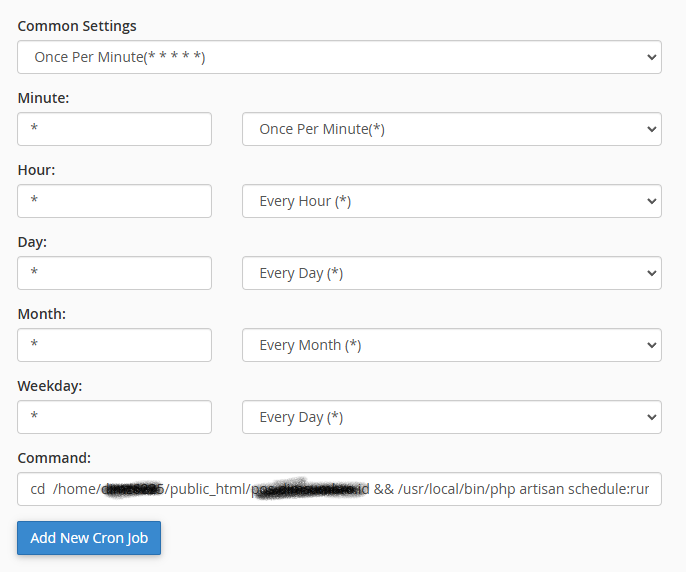
Replace nexopos-directory with your actual installation folder.
Note: The PHP binary path (/usr/local/bin/php) may vary. You can confirm it using:
which phpCron Jobs on Laravel Forge
Laravel Forge provides a user-friendly interface for cron jobs.
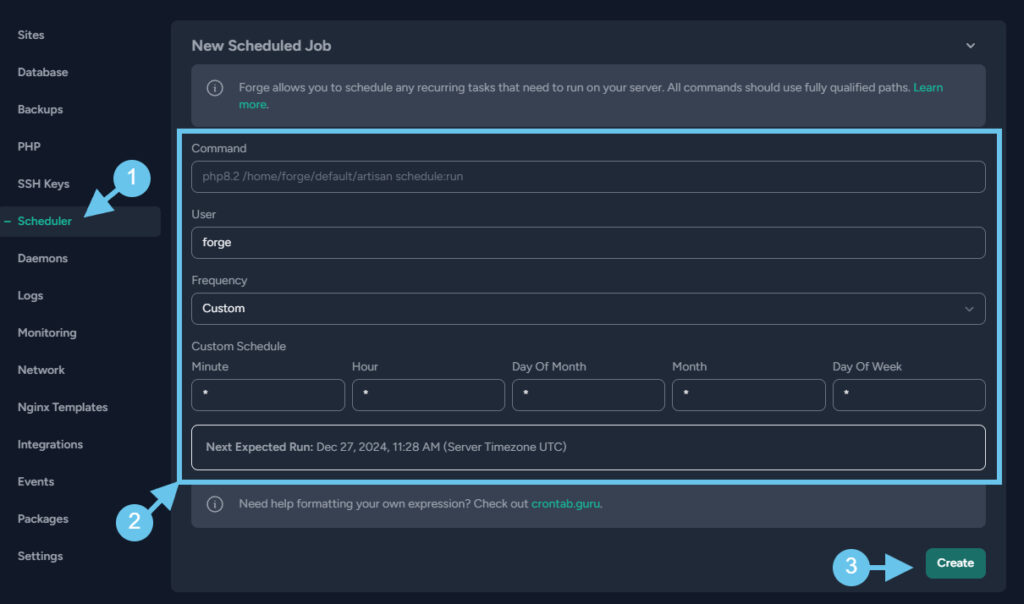
Use the following command (adjusting the PHP version and path as needed):
php8.3 /home/username/nexopos/artisan schedule:runTo retrieve the correct path, run:
pwdfrom within your NexoPOS directory.
Cron Jobs on Linux (Ubuntu)
Edit the crontab for your user:
crontab -e -u usernameThen add:
* * * * * cd /path/to/nexopos && php artisan schedule:run >> /dev/null 2>&1Replace /path/to/nexopos with your actual installation path.
Configuring Supervisor (Optional)
Supervisor is used to manage long-running background processes such as queues. While optional, it is recommended for a smoother experience when using queues.
Since NexoPOS is built on Laravel, you can follow Laravel’s official documentation for advanced queue and Supervisor configuration.