
ns-dashboard-menus
This filter is used to modify the dashboard side menu. It accepts one parameter which is the menu at its current state. Note that the end menu might be different from the expected result as other modules can overwrite the menu.
Using a higher priority, make your script execute after every other. Here is how you'll register a custom menu.
<?php
namespace Modules\YourModuleNamespace\Providers;

use Illuminate\Support\ServiceProvider;
use App\Classes\Hook;

class ModuleSerivceProvider extends ServiceProvider
{
    public function register()
    {
        Hook::addFilter( 'ns-dashboard-menus', function( $menus ) {
            $menus[ 'my-menus' ]  =   [
                'label'   =>  __( 'Your Menu' ),
                'href'    =>  url( '/' ),
                'permissions'  =>  [], // accept an array of permissions
                'icon'    =>  'fa-icon', // use https://icons8.com/line-awesome icons.
                'childrens' =>  [
                    // sub menu having the same shape as the parent, excluding "childrens" and "icon".
                ]
            ];

            return $menus;
        });
    }
}
You can set a priority by passing an additional parameter to the "addFilter" function.
Controlling Menu Visibility With Permissions
If your menus require certain permissions to be visible to a user, you'll need to use the "permissions" attribute, which accepts an array of "permissions" namespaces (identifiers).
[
    'permissions'   =>   [ 'see.in.dark' ]
]
If more than one permission is provided, the user must have these permissions attached to their role.
Providing Sub Menus
The menu can only accept a hierarchy with one level down. This means a sub-menu cannot have sub-menus. The shape of a sub menu is similar to the parent menu, but doesn't include "icon" and "children", which don't apply to sub menus.
[
    //
    'childrens'  =>  [
        'submenu'  => [
            'label'   => 'Sub menu Label'
        ]
    ],
    //
]
Every submenu, same as the parent, must be defined as a key-value pair. Make sure to define unique keys to avoid any possible conflict.
<?php
namespace Modules\YourModuleNamespace\Providers;

use Illuminate\Support\ServiceProvider;
use App\Classes\Hook;

class ModuleSerivceProvider extends ServiceProvider
{
    public function register()
    {
        Hook::addFilter( 'ns-dashboard-menus', function( $menus ) {
            $menus[ 'my-menus' ]  =   [
                'label'   =>  __( 'Your Menu' ),
                'href'    =>  url( '/' ),
                'permissions'  =>  [], // accept an array of permissions
                'icon'    =>  'fa-icon', // use https://icons8.com/line-awesome icons.
                'childrens' =>  [
                    'submenu' =>  [
                        'label'   =>  __( 'First Submenu' ),
                        'href'    =>  url( '/url/to/page' ),
                        'permissions'  =>  [], // any permission to contro visibility.
                    ]
                ]
            ];

            return $menus;
        });
    }
}
Inserting A Menu At A Specific Position
Most of the time, menus are injected at the end of the list. However, it's possible to insert a menu or submenu before or after another menu. The key point here is to know the identifier of the menu. For example, if we would like to add a menu before inventory, we'll inspect the dashboard and get the identifier of the menu that displays the inventory's menu.
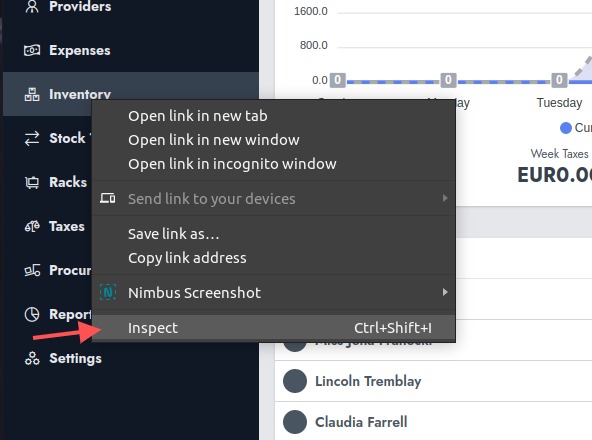
From there, you should be able to spot the menu identifier.
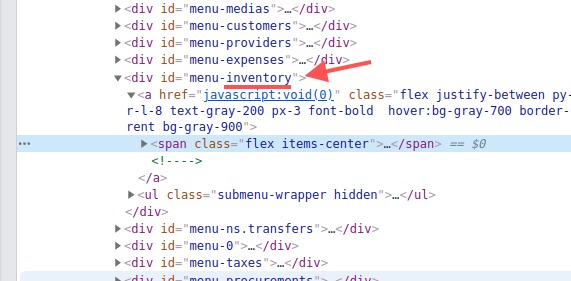
In our example, the menu identifier we'll use is "inventory" and not "menu-inventory". We'll then use that identifier to insert a menu before "inventory".
<?php
namespace Modules\YourModuleNamespace\Providers;

use Illuminate\Support\ServiceProvider;
use App\Classes\Hook;

class ModuleSerivceProvider extends ServiceProvider
{
    public function register()
    {
        Hook::addFilter( 'ns-dashboard-menus', function( $menus ) {
            $menus  =   array_insert_after( $menus, 'inventory', [
                'my-menus'  =>  [
                    'label'   =>  __( 'Your Menu' ),
                    'href'    =>  url( '/' ),
                    'permissions'  =>  [], // accept an array of permissions
                    'icon'    =>  'fa-icon', // use https://icons8.com/line-awesome icons.
                    'childrens' =>  [
                        'submenu' =>  [
                            'label'   =>  __( 'First Submenu' ),
                            'href'    =>  url( '/url/to/page' ),
                            'permissions'  =>  [], // any permission to contro visibility.
                        ]
                    ]
                ]
            ]);


            return $menus;
        });
    }
}
The function "array_insert_before" can be used to insert an array before a specific key. The function "array_insert_after" can be used to insert an array after a specific key.