

Nexo SaaS — Build and Manage a NexoPOS Hosting Business
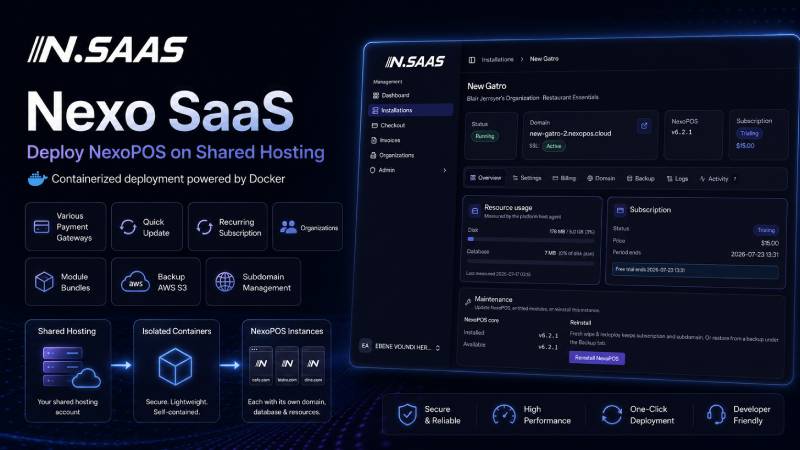
Nexo SaaS is a complete hosting and subscription management platform designed for businesses, developers, agencies, and NexoPOS service providers who want to deploy and manage multiple NexoPOS installations from a centralized application.
Instead of manually configuring servers, domains, databases, modules, backups, and subscriptions for every customer, Nexo SaaS turns the entire process into a structured and manageable workflow.
The application runs using Docker Compose, allowing the required services and infrastructure components to be deployed consistently. This reduces environment-related issues and makes it easier to install, maintain, update, and move the platform between compatible servers.
Nexo SaaS is not only an installation manager. It provides the tools required to package NexoPOS as a hosted service, create recurring subscription plans, sell optional features, manage customer organizations, and maintain multiple installations from one administrative dashboard.
Who Is Nexo SaaS For?
Nexo SaaS is suitable for anyone who wants to offer NexoPOS as a managed service rather than selling or installing it manually for each customer.
NexoPOS Resellers
Resellers can use Nexo SaaS to provide customers with ready-to-use NexoPOS installations. Instead of performing every installation manually, they can define plans, prepare module bundles, deploy customer instances, and manage subscriptions from one place.
Web Hosting Providers
Hosting companies can add NexoPOS hosting to their existing services. Customers can subscribe to a plan and receive an isolated NexoPOS installation with a subdomain, selected modules, storage limits, and optional add-ons.
Software Agencies
Agencies that deploy NexoPOS for restaurants, retail stores, warehouses, pharmacies, and other businesses can centralize the management of their customer installations.
The agency can control updates, modules, backups, domains, subscription status, and access restrictions without connecting manually to every server.
Independent Developers
Developers can use Nexo SaaS as the foundation for launching their own NexoPOS-based SaaS business. The platform handles much of the infrastructure and subscription logic required to convert NexoPOS into a recurring service.
Organizations With Multiple Businesses
Companies managing several branches, stores, franchises, or independent business units can use Nexo SaaS to organize and maintain multiple NexoPOS installations under a single organization.
Centralized NexoPOS Installation Management
Nexo SaaS provides a centralized interface for deploying and managing NexoPOS installations.
Administrators can create new installations, review their status, suspend access, control uploads, manage domains, and perform maintenance operations without manually editing server configuration files.
Each installation can be managed independently, allowing the platform owner to support different customers, plans, modules, and operational requirements.
Deploy NexoPOS Installations
New NexoPOS installations can be deployed directly from the application.
The deployment workflow prepares the required application environment and connects the installation to its assigned customer, organization, subscription plan, domain, and module bundle.
Because the infrastructure is based on Docker Compose, the required services can be shipped in a consistent and reproducible environment.
Suspend Installations
An installation can be suspended when a subscription expires, a payment fails, a trial ends, or an administrator needs to temporarily disable access.
Suspension makes it possible to enforce subscription rules without immediately deleting the customer’s data or configuration.
Control File Uploads
Administrators can block uploads for selected installations.
This can be useful when an account reaches its limits, violates platform rules, has an overdue subscription, or requires temporary restrictions while an issue is being reviewed.
Flexible Subscription Plans
Nexo SaaS allows administrators to create subscription plans for different customer profiles.
A plan can define how customers access the service, how much they pay, which features they receive, and whether optional services are available.
Recurring Subscriptions
Plans can be configured with recurring billing, allowing customers to pay at regular intervals.
This makes Nexo SaaS suitable for monthly, quarterly, yearly, or other subscription-based business models supported by the configured payment gateway.
Trial Periods
Plans can include a trial period, allowing potential customers to test the service before the first recurring payment.
Trials can be used to demonstrate the platform, reduce adoption barriers, and allow customers to confirm that NexoPOS meets their operational needs.
Custom Entry Pricing
A plan can use a special introductory price before switching to its normal recurring price.
For example, a provider may offer:
- A discounted first month
- A free initial period
- A reduced onboarding price
- A promotional entry fee
- A different price for the first billing cycle
This gives platform owners more flexibility when creating promotions and customer acquisition campaigns.
Module Bundles
Nexo SaaS allows administrators to group multiple NexoPOS modules into reusable bundles.
A bundle can be assigned to a subscription plan or installation, making it easier to create packages for specific business types.
For example, a provider could create:
Restaurant Bundle
A package containing modules designed for restaurants, cafés, bars, bakeries, and food-service businesses.
Retail Bundle
A package designed for supermarkets, clothing stores, electronics stores, cosmetics shops, and other retail businesses.
Warehouse Bundle
A package containing inventory, stock transfer, rack management, bulk import, or multistore modules.
Custom Business Bundle
A provider can create a specialized bundle for a particular customer, industry, franchise, or operational workflow.
Bundles simplify product management because administrators do not need to configure every module separately for every installation.
GitHub Integration
Nexo SaaS integrates with GitHub to retrieve and manage both NexoPOS and its modules.
This allows the platform to use configured repositories as controlled application sources.
GitHub integration can support workflows such as:
- Retrieving NexoPOS releases
- Accessing module repositories
- Deploying specific versions
- Preparing application updates
- Keeping module sources organized
- Controlling which versions are available for installation
This gives platform owners a more structured way to manage application and module delivery across multiple customer environments.
Subdomain Management
Each NexoPOS installation can be assigned a subdomain.
For example:
customer1.yourplatform.com
restaurant-name.yourplatform.com
branch-city.yourplatform.com
Subdomain management allows new installations to become accessible without requiring every customer to purchase or configure a separate domain.
This is especially useful for trials, entry-level plans, internal installations, and customers who want to start using NexoPOS immediately.
Custom Domain Add-on
Customers who want to use their own domain can purchase or activate the custom domain add-on.
Instead of accessing their installation through a platform subdomain, they can use an address such as:
pos.customerbusiness.com
Custom domains help agencies and hosting providers deliver a more professional and branded service.
Because custom domains are managed as add-ons, they can be sold separately from the main subscription plan.
AWS S3 Backups
Nexo SaaS supports backups using Amazon S3-compatible storage.
Backups can be stored outside the main application server, reducing the risk of losing both the active installation and its backup during a server failure.
Off-site backup storage is especially important for production POS systems that may contain:
- Sales records
- Customer information
- Product catalogs
- Inventory history
- Accounting data
- Supplier records
- Business configuration
- Uploaded documents and images
Automatic Backup Add-on
Automatic backups can be offered as an optional paid add-on.
Customers who activate this service can have their installation backed up automatically based on the platform configuration.
This allows the provider to create additional recurring revenue while offering customers an important operational and data-protection service.
The automatic backup add-on can be kept separate from lower-cost plans or included by default in premium packages.
Organizations
Nexo SaaS supports organizations, allowing multiple installations, users, or business resources to be grouped under a common entity.
An organization can represent:
- A company
- A reseller
- A franchise
- A customer account
- A group of stores
- A restaurant chain
- An agency managing several clients
Organization support makes the platform suitable for more complex business relationships than a simple one-user, one-installation model.
A single organization may operate several NexoPOS installations, depending on the platform rules and subscription configuration.
Sets
Sets provide another level of organization for installations and related resources.
They can be used to group installations according to an internal structure such as:
- Region
- Customer category
- Business type
- Subscription package
- Franchise group
- Support level
- Deployment environment
- Operational team
This helps platform administrators manage a growing number of customers without relying on an unstructured list of installations.
Application and System Logging
Nexo SaaS provides both application and system logging to help administrators understand what is happening across the platform.
Application Logs
Application logs can help identify errors related to the Nexo SaaS application, customer actions, subscriptions, module operations, deployments, and internal workflows.
System Logs
System logs provide visibility into infrastructure-level events and services involved in running customer installations.
Logging is essential when managing multiple hosted applications because it helps administrators investigate failed deployments, configuration issues, update problems, and unexpected system behavior.
Built With Docker Compose
Nexo SaaS uses Docker Compose to package and run its required services.
This approach helps standardize the runtime environment and reduces differences between server configurations.
Docker Compose provides several practical benefits:
- Faster infrastructure setup
- Consistent service configuration
- Easier server migration
- Simplified dependency management
- Better separation between services
- Reproducible deployments
- Easier maintenance and troubleshooting
The platform owner still needs a properly configured server and should understand the basics of Docker, networking, domains, DNS, SSL certificates, storage, and server security.
Nexo SaaS simplifies the deployment process, but it does not replace responsible server administration.
Create Different Service Packages
Nexo SaaS can be used to create multiple commercial offers for different customer needs.
Starter Plan
A basic plan could include one NexoPOS installation, a shared subdomain, limited storage, and a small module bundle.
Professional Plan
A professional plan could include additional modules, automatic backups, higher limits, priority support, and custom domain support.
Enterprise Plan
An enterprise plan could include multiple installations, organization management, specialized module bundles, advanced backup policies, and custom onboarding.
Industry-Specific Plans
Plans can also be created for specific industries, such as:
- Restaurants and cafés
- Grocery and retail stores
- Warehouses
- Pharmacies
- Clothing stores
- Electronics stores
- Wholesale businesses
- Franchise networks
- Service businesses
More Than a Deployment Tool
Nexo SaaS is designed to cover the complete lifecycle of a hosted NexoPOS service.
It helps platform owners move from manually installing NexoPOS for individual customers to operating a structured subscription business.
From the same platform, administrators can manage:
- Customer installations
- Deployment status
- Subscription plans
- Trial periods
- Introductory pricing
- Recurring billing
- Module bundles
- GitHub sources
- Platform subdomains
- Custom domains
- AWS S3 backups
- Automatic backup add-ons
- Organizations
- Installation sets
- Application logs
- System logs
Example Business Scenario
A software agency wants to offer managed NexoPOS installations to restaurants.
The agency creates a restaurant plan with a 14-day trial and a discounted first month. It then creates a restaurant module bundle containing the modules required by its customers.
When a restaurant subscribes, the agency deploys a new NexoPOS installation and assigns a subdomain such as:
myrestaurant.agency-pos.com
The customer can later activate a custom domain and automatic backups as paid add-ons.
If the subscription expires, the agency can suspend the installation without immediately removing its data. When the subscription is renewed, access can be restored.
As the agency grows, it can group customers into organizations and sets, monitor application and system logs, and manage all installations from a single dashboard.
Important Requirements
Nexo SaaS is intended for users who are comfortable managing web applications and server infrastructure.
Depending on the deployment environment, the platform owner may need knowledge of:
- Docker and Docker Compose
- Linux server administration
- DNS configuration
- Domains and subdomains
- Reverse proxies
- SSL certificates
- GitHub repositories
- AWS S3 or compatible storage
- Email delivery
- Payment gateway configuration
- Server monitoring and security
The exact infrastructure requirements may vary depending on the number of installations, traffic, storage usage, backup frequency, and enabled modules.
Conclusion
Nexo SaaS provides the foundation required to create a managed NexoPOS hosting and subscription business.
It combines installation management, Docker-based deployment, recurring plans, trial periods, introductory pricing, module bundles, GitHub integration, domain management, off-site backups, add-ons, organizations, sets, and system logging in one application.
Whether you are a NexoPOS reseller, hosting provider, software agency, independent developer, or organization managing multiple businesses, Nexo SaaS helps you deploy and operate NexoPOS installations through a centralized and scalable workflow.